
Technical SEO is the foundation that determines whether your website can be found, crawled, and understood by search engines. Even with high-quality content and strong backlinks, your site cannot reach its full ranking potential if its technical structure is weak.
From website speed and mobile responsiveness to crawlability, indexing, and security, technical SEO ensures that every part of your site works together to deliver a seamless user experience and strong search performance.
In a digital landscape where competition is fierce and search algorithms continue to evolve, understanding and implementing technical SEO is essential for improving visibility, driving organic traffic, and achieving long-term website success.
What Is Technical SEO? A Quick Overview

Technical SEO refers to optimizing the backend structure of your website so search engines can crawl, index, and understand your pages. Its purpose is to ensure your site loads fast, is mobile-friendly, secure, and free of technical errors allowing your content to rank effectively.
It focuses on:
Website infrastructure
Server performance
Code quality
Crawlability and indexability
Speed, security, and mobile usability
To better understand how Google discovers and ranks content, check out our detailed guide on how search engines work.
How Technical SEO Differs From Other SEO Types
Technical SEO focuses on your website’s infrastructure, ensuring search engines can crawl, index, and understand your pages. It deals with site speed, mobile-friendliness, security, structured data, and fixing technical errors.
On-page SEO optimizes your content, including keywords, titles, meta descriptions, headers, and internal links to improve relevance and user experience. Storytelling improves user engagement and content relevance, explore how storytelling enhances content marketing.
Off-page SEO builds your site’s authority through backlinks, social signals, and brand reputation.
In simple terms:
Technical SEO makes your site accessible, on-page SEO makes it valuable, and off-page SEO makes it trustworthy. Without technical SEO, even the best content may never reach your audience.
If you’re new to SEO, our SEO Starter Guide offers a clear introduction to how SEO works across all categories
How Technical SEO Impacts Website Performance

Technical SEO plays a major role in how efficiently your website loads, operates, and responds to both users and search engines. Strong technical optimization ensures your site performs smoothly, delivers a positive user experience, and meets Google’s ranking requirements.
1. Improves Crawlability and Indexing
Technical SEO ensures search engines can easily crawl and index your pages. A properly configured robots.txt, XML sitemap, and clean site structure help search bots navigate your site without issues.
2. Enhances Page Loading Speed
Fast-loading pages reduce bounce rates and improve engagement. Optimizations like image compression, code minification, browser caching, and using a CDN directly boost site speed and search rankings.
3. Strengthens Mobile Performance
With mobile-first indexing, Google prioritizes mobile usability. Technical SEO ensures your site is responsive, easy to navigate, and functional on all devices improving both user experience and visibility.
4. Ensures a Secure Browsing Experience
HTTPS encryption protects user data and is a confirmed ranking factor. A secure website builds trust and prevents “Not Secure” browser warnings.
5. Fixes Errors That Slow Down or Block Your Site
Technical SEO identifies and resolves issues like broken links, redirect loops, duplicate content, and server errors. Fixing these improves both usability and crawl efficiency.
6. Improves Overall User Experience (UX)
A technically optimized site feels faster, cleaner, and more reliable. Smooth navigation, stable layouts, and responsive design help users stay longer signals that search engines reward.
Website Speed & Core Web Vitals
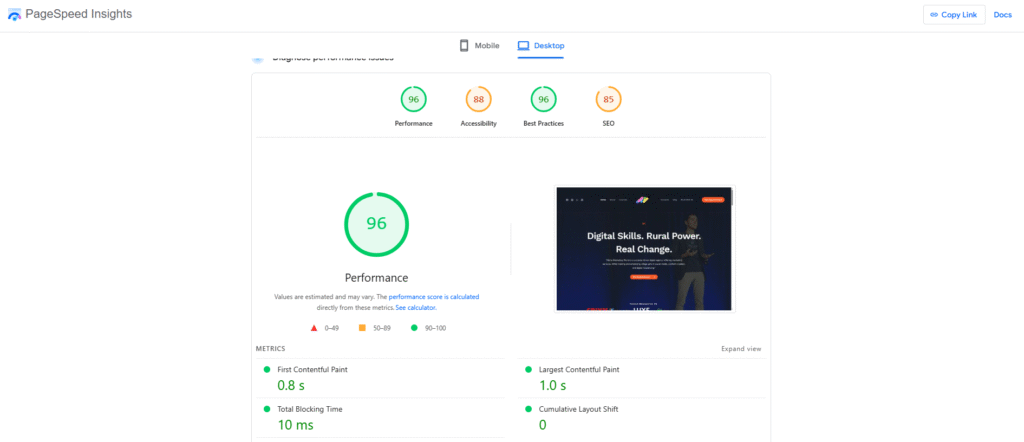
Website speed is a critical component of technical SEO, directly influencing your rankings, user satisfaction, and overall site performance. When your website loads slowly, visitors are more likely to leave immediately, sending negative signals to search engines.
To help webmasters improve real-world performance, Google introduced Core Web Vitals, a set of metrics that measure the quality of a user’s page experience.
What Are Core Web Vitals?
Core Web Vitals consist of three key metrics that evaluate how quickly and smoothly your website loads and responds:
Largest Contentful Paint (LCP) measures how long it takes for the main content to appear on the screen. A good LCP score is 2.5 seconds or faster, ensuring users can see meaningful content right away.
Cumulative Layout Shift (CLS) evaluates visual stability by checking whether elements on the page move around unexpectedly while loading. A stable layout with a CLS score under 0.1 prevents accidental taps and provides a smoother viewing experience.
Interaction to Next Paint (INP) tracks how quickly your site responds when users take action, such as clicking a button or typing in a field. A strong INP score of 200 milliseconds or less ensures a responsive, frustration-free experience.
Together, these metrics represent how users actually experience your site, not just how it performs in theory.
Why Website Speed and Core Web Vitals Matter for SEO
Google considers page experience and loading performance as ranking factors, which means faster websites have a direct advantage in search results. When your site loads quickly and functions smoothly, users stay longer, explore more pages, and are more likely to convert.
Strong Core Web Vitals also reduce bounce rates and improve overall engagement, two signals that search engines reward with better visibility. In short, optimizing speed and Core Web Vitals not only enhances user experience but also strengthens your SEO performance.
How to Improve Website Speed & Core Web Vitals
Improving website speed involves several technical optimizations. Start by compressing and properly sizing your images to reduce load times. Minify CSS, JavaScript, and HTML files to remove unnecessary code. Use browser caching so returning visitors load pages faster.
A Content Delivery Network (CDN) helps deliver your content from servers closer to users, decreasing latency. Reducing heavy scripts, optimizing server response times, and enabling lazy loading for images and videos also contribute to better performance. Regular testing using tools like Google PageSpeed Insights or Lighthouse will help you identify issues and monitor progress.
Mobile-Friendliness & Responsive Design

With the rise of mobile browsing, mobile-friendliness has become one of the most important factors in technical SEO. Today, the majority of users access websites through smartphones or tablets, which means your site must deliver a seamless experience across all devices. Google now uses mobile-first indexing, meaning the mobile version of your website, not the desktop version, is primarily used for ranking and indexing.
If your site isn’t optimized for mobile users, it can lead to lower visibility, higher bounce rates, and a poor overall search performance. This makes responsive design a critical element of modern SEO.
Why Responsive Design Matters
Responsive design ensures your website automatically adapts to different screen sizes, offering consistent usability whether someone visits from a phone, tablet, or desktop. A responsive site loads properly structured content, readable text, scalable images, and easy-to-click buttons without requiring users to zoom or scroll awkwardly.
Search engines reward responsive websites because they provide a positive user experience, reduce friction, and keep visitors engaged longer. When your design is fluid and flexible, users are more likely to stay, explore, and convert, which sends strong positive signals to Google.
Good design practices also help mobile usability, discover essential graphic designing techniques here.
Google’s Mobile-First Indexing
Google’s shift to mobile-first indexing means that your mobile site is the primary version evaluated for ranking. If your mobile experience is incomplete, slow, or visually broken, search engines may view your entire site as low quality. This makes it essential to ensure your mobile layout matches (or exceeds) the quality of your desktop version.
Key factors Google looks for include:
Fast loading on mobile networks
Properly sized text and images
Easy tap targets (links and buttons)
No intrusive pop-ups
Consistent content between mobile and desktop
If your mobile version is weak, your SEO performance will suffer regardless of how strong your desktop design is.
How to Improve Mobile Usability
Improving mobile usability involves both design and technical enhancements. Start with a responsive theme or layout that adjusts automatically to different screen sizes. Optimize your images and use next-gen formats (WebP) to speed up loading times on mobile devices.
Ensure your fonts are large enough for comfortable reading, and space your interactive elements to prevent accidental taps. Avoid heavy scripts that slow down mobile performance, and test your site regularly using Google’s Mobile-Friendly Test.
These improvements create a smoother user experience and help boost your rankings in mobile search results.
HTTPS and Website Security
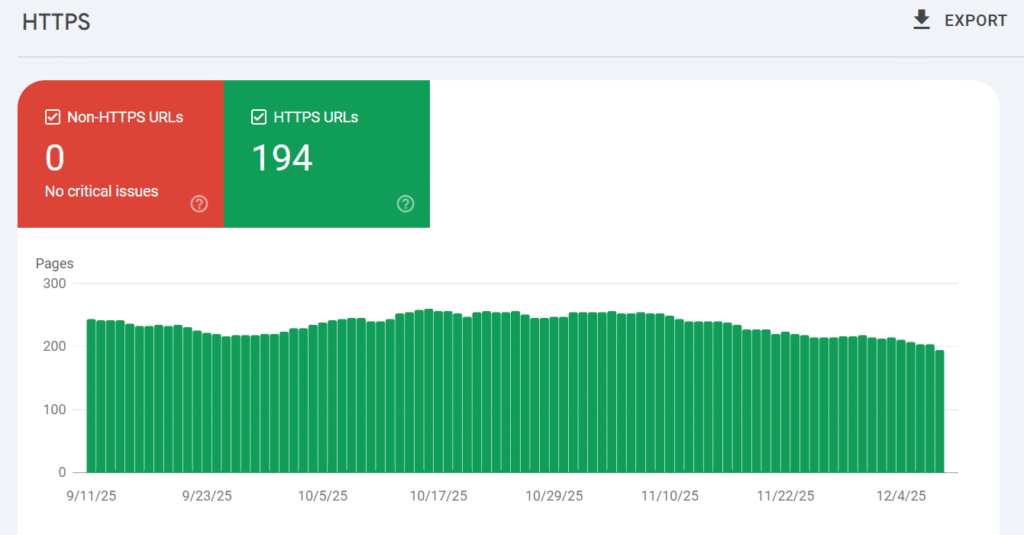
Website security is a crucial part of technical SEO and a major trust factor for both users and search engines. Modern websites must protect user data, prevent security breaches, and offer a safe browsing experience. Google has made security a priority by marking non-HTTPS sites as
Not Secure in browsers, which can instantly reduce user trust and increase bounce rates. This makes adopting HTTPS not just a technical upgrade, but a core requirement for strong SEO performance and overall website credibility.
Why HTTPS Matters for SEO
HTTPS (Hypertext Transfer Protocol Secure) encrypts the communication between the user’s browser and the website server, ensuring that sensitive information such as passwords, personal details, or payment data remains protected. Google uses HTTPS as a ranking signal, meaning secure websites have an advantage over unsecured ones.
Search engines favor HTTPS because it improves user safety, reduces the risk of data interception, and supports a more trustworthy web environment. A secure site also increases user confidence, which leads to longer visit durations and higher engagement, two factors that support improved rankings.
How SSL Certificates Improve Website Trust
An SSL certificate is required to enable HTTPS. Once installed, users see a padlock icon in the browser’s address bar, indicating that the website is secure. This simple visual cue significantly boosts user trust, especially for e-commerce stores, membership sites, or any platform requiring personal information.
Without an SSL certificate, browsers warn visitors that the connection is unsafe, causing most users to leave immediately. By securing your site with SSL, you create a professional, trustworthy appearance that encourages users to stay and interact.
Common Security Issues That Hurt SEO
Weak security can lead to several problems that negatively impact SEO. Issues such as mixed content errors, malware infections, hacked pages, and insecure third-party scripts can trigger browser warnings or cause Google to temporarily deindex your site. Also, outdated plugins, weak passwords, or unsecured forms can expose vulnerabilities.
When search engines detect these risks, they may lower your rankings or block access to protect users. Ensuring strong security practices, regular updates, secure hosting, SSL enforcement, and routine security audits helps maintain a clean, healthy site that search engines trust.
Fixing Technical Errors That Hurt SEO
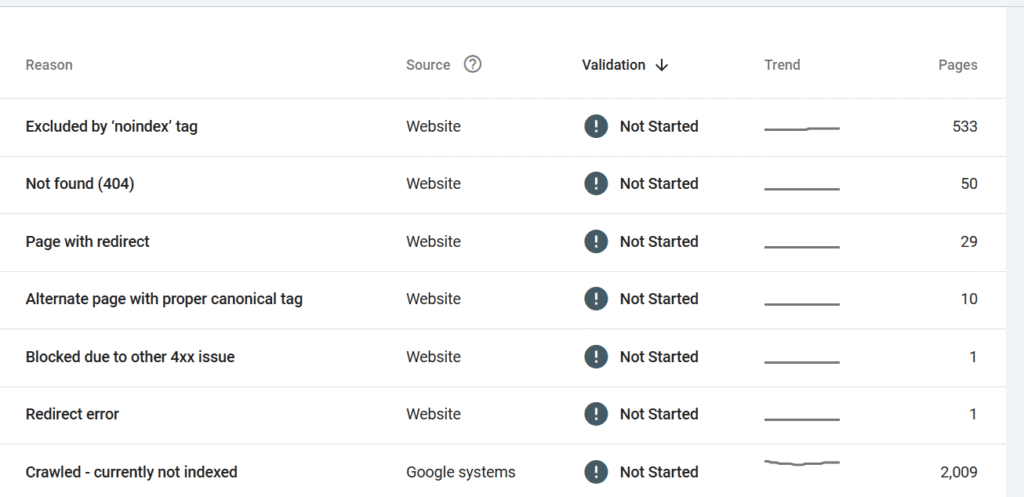
Technical errors can quietly damage your website’s performance by preventing search engines from crawling your pages, confusing indexing signals, and creating a poor user experience. Even small issues like broken links or incorrect redirects can add up and weaken your rankings over time.
Regularly auditing and fixing technical problems ensures that your website remains healthy, accessible, and fully optimized for search engines. Addressing these errors is a core part of maintaining strong technical SEO.
404 Errors and Broken Links
Broken links and 404 (Page Not Found) errors disrupt both user experience and crawl efficiency. When search engines encounter a 404, they may stop exploring related pages, reducing your site’s overall visibility.
Users who land on broken pages often leave immediately, increasing bounce rates. Fixing broken links either by updating URLs or redirecting them helps preserve link equity and ensures a smooth navigation flow for both users and search engines.
Redirect Chains and Loops
Redirects are useful, but too many consecutive redirects (redirect chains) can slow down your site and waste crawl budget. Even worse, redirect loops trap both users and search engines in an endless cycle, preventing pages from loading at all.
Cleaning up redirects by pointing URLs directly to their final destination improves loading speed, reduces server strain, and ensures search engines can access your pages without interruption.
Duplicate Content Issues
Duplicate content occurs when multiple URLs display identical or very similar content. This confuses search engines, which struggle to determine which version should rank. Common causes include URL variations, HTTP/HTTPS duplicates, pagination issues, and non-canonical pages.
Implementing canonical tags, consolidating duplicate URLs, and ensuring one authoritative version of each page helps preserve search equity and prevents ranking dilution.
Thin Content and Orphan Pages
Thin content pages contain little to no valuable information, offering poor search value. Orphan pages not linked from anywhere on your site are difficult for search engines to discover. Both can weaken your site’s authority and waste crawl resources.
Strengthening thin content with helpful information, merging weak pages, and adding internal links ensures every indexed page provides value and contributes to a stronger SEO profile.
Server Errors and Crawl Issues
Server problems such as 5xx errors, timeouts, or blocked resources prevent search engines from fully crawling your site. These issues can cause temporary ranking drops or even removal from search results if persistent.
Regular monitoring through tools like Google Search Console allows you to catch crawl errors early and work with your hosting provider or developer to resolve them quickly. A reliable server environment ensures search engines can access your site consistently.
Structured Data & Schema Markup
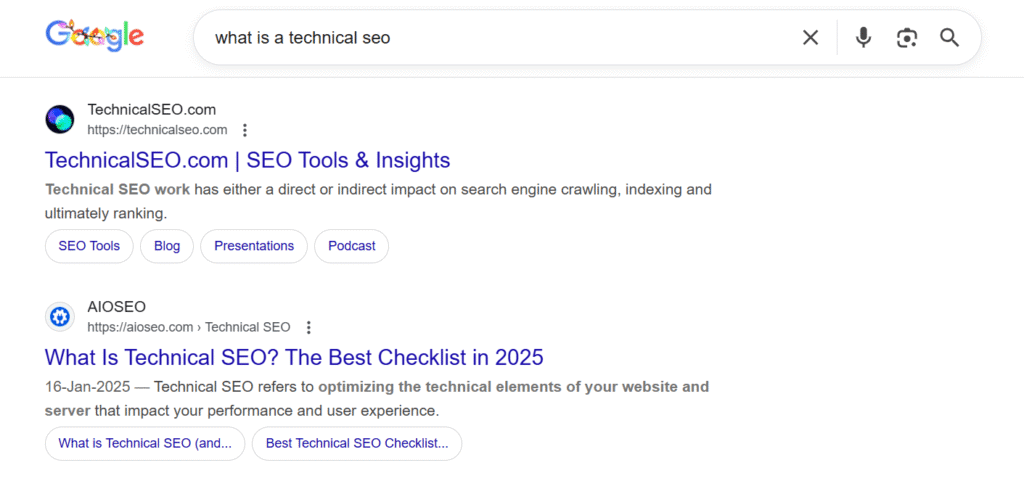
Structured data plays a crucial role in helping search engines understand the content and purpose of your web pages. While search engines are sophisticated, they still rely on clear signals to interpret different types of information. Schema markup, a form of structured data, provides those signals by labeling content in a way that search engines can easily process.
structured data not only improves how your content is understood but also increases your chances of appearing in enhanced search results, known as rich snippets, which can significantly boost visibility and click-through rates.
What Schema Is and Why It Matters
Schema markup is a standardized vocabulary used to describe different elements on a webpage such as products, reviews, FAQs, articles, and more. When you add schema to your site, you give search engines additional context, helping them identify key information quickly and accurately.
This extra layer of detail improves your site’s relevance in search results and helps Google match your content to user intent more effectively. In a competitive SEO landscape, using schema markup can give your pages a notable advantage over sites without it.
Types of Schema That Improve SEO
There are many schema types available, each designed for a specific content format. Some of the most common and effective include:
Article Schema – Helps search engines understand blog posts and news content.
FAQ Schema – Displays frequently asked questions directly in search results.
Product Schema – Used by e-commerce sites to highlight product details such as price, availability, and reviews.
Review Schema – Allows star ratings and review snippets to appear in SERPs.
How-To Schema – Provides step-by-step instructions in a visual format.
Using the right schema type enhances your content’s appearance in search results and may increase engagement. Different content formats like podcasts can also benefit from structured data, learn why podcasting is becoming a major marketing channel.
How Schema Increases Visibility With Rich Snippets
Rich snippets are enhanced search results that display additional information, such as ratings, images, prices, or FAQs. When your site implements structured data correctly, it becomes eligible for these rich snippets making your listings more eye-catching than standard blue links. Rich snippets often lead to:
Higher click-through rates (CTR)
Improved visibility above competitors
Better user understanding before clicking
Increased authority and credibility
While schema doesn’t guarantee rich snippets, it greatly increases your chances of earning them.
Importance of Website Architecture
Website architecture refers to how your pages are organized, linked, and structured. A well-designed architecture helps both users and search engines easily navigate your website. When your site is logically arranged, search engines can efficiently crawl your pages, understand their relationships, and prioritize the most important content.
A strong website architecture also improves user experience, keeps visitors engaged, and increases the likelihood that your content will rank higher. In short, good architecture is the backbone of scalable and effective technical SEO.
Clear Navigation and Internal Linking
A clear navigation structure ensures that users can quickly find the information they need. Search engines also rely on intuitive navigation to discover and evaluate your pages. Internal linking strengthens this process by connecting relevant pages throughout your site.
Benefits of strong internal linking include:
Distributing page authority across your site
Helping search engines crawl deeper pages
Supporting topical relevance and content clusters
Guiding users to valuable resources
When your internal links are clean and purposeful, both user engagement and search engine understanding improve.
Flat vs. Deep Site Structure
A flat site structure means that important pages are only a few clicks away from the homepage. This makes your site easier for search engines to crawl and encourages more even distribution of authority.
In contrast, a deep structure, where pages are buried behind many layers, can make it difficult for search bots to discover important content.
Flat architecture is preferred because it:
Improves crawl efficiency
Reduces indexing issues
Helps pages rank faster
Enhances user navigation and satisfaction
Keeping your structure shallow and intuitive ensures a smoother experience for both users and search engines.
How Good Architecture Improves Crawl Efficiency
Search engines allocate a crawl budget the number of pages they will crawl during each visit. If your architecture is confusing, with many unnecessary layers or broken paths, Google may waste budget on unimportant pages and miss the ones you want to rank.
Good architecture improves crawl efficiency by:
Creating direct access to key pages
Reducing crawl errors
Eliminating duplicate or unnecessary URLs
Providing clear hierarchical relationships
When search engines can crawl your website without obstacles, your important content gets indexed faster and more accurately.
Technical SEO and User Experience (UX)

Technical SEO and user experience (UX) are closely connected. Even if your site is technically “optimized” for search engines, it won’t perform well if visitors find it slow, confusing, or hard to use.
Search engines want to rank pages that people actually enjoy using, so many technical SEO factors like speed, mobile-friendliness, layout stability, and security directly affect UX. When you improve your technical setup, you’re not just helping Google; you’re making your website more enjoyable and trustworthy for real users.
How UX Influences Rankings
A good user experience sends strong positive signals to search engines. When your site is fast, easy to navigate, and visually stable, visitors tend to:
Stay on your pages longer
Click through to more content
Bounce less often
These behaviors tell search engines that your site is helpful and relevant. On the other hand, a poor UX, slow loading, broken layouts, or hard-to-read text causes users to leave quickly, which can hurt your rankings over time. Technical SEO makes sure the “behind the scenes” setup supports a smooth, frustration-free experience.
For deeper insights into building stronger engagement, see our list of effective digital marketing tactics.
Page Layout, Stability, and Readability
Technical SEO affects how your pages actually feel when someone uses them. Clean HTML structure, proper heading hierarchy (H1, H2, H3), and responsive design all help users scan and understand your content. Metrics like Cumulative Layout Shift (CLS) measure whether elements jump around as the page loads an unstable layout is annoying and can lead to accidental clicks.
By optimizing fonts, spacing, image sizes, and layout stability, you improve both usability and your Core Web Vitals, which are part of Google’s ranking system.
Accessibility and Inclusive Design
Many technical SEO best practices overlap with accessibility. Using semantic HTML, descriptive alt text for images, proper labels for buttons and forms, and keyboard-friendly navigation helps users with disabilities interact with your site more easily.
This not only creates a more inclusive experience but also helps search engines better understand your content structure. When your site is accessible, fast, and well-organized, it naturally offers better UX which supports stronger SEO performance overall.
Common Technical SEO Tools You Should Use
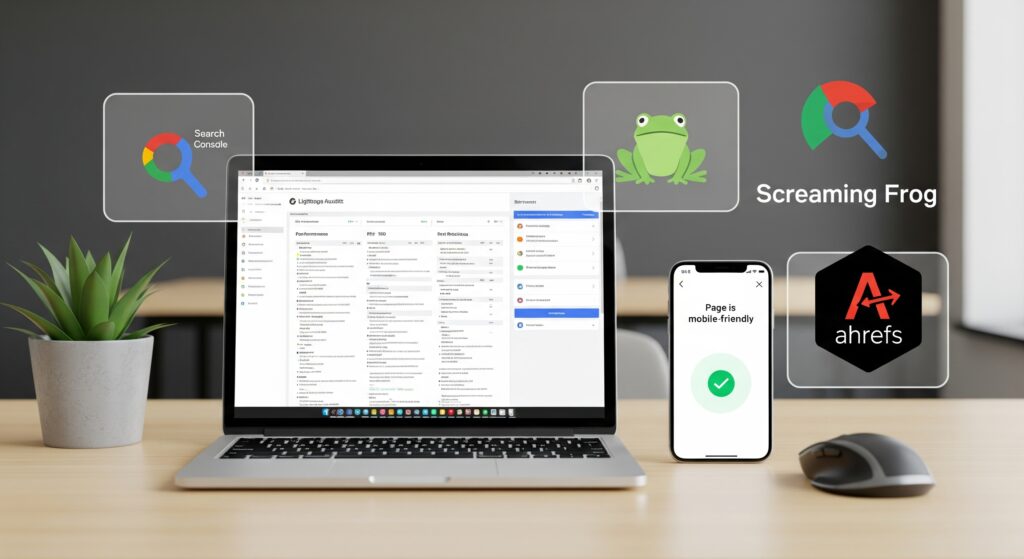
To maintain a healthy, high-performing website, you need the right tools to monitor crawl issues, identify technical errors, measure speed, and improve overall SEO strength. Technical SEO tools help you quickly diagnose problems that may be holding your site back from broken links and slow loading times to indexing errors and structural issues.
Using these tools consistently ensures your website stays optimized, search-engine-friendly, and ready to rank.
Google Search Console
Google Search Console (GSC) is one of the most essential tools for technical SEO. It provides direct insights from Google about how your website is crawled and indexed. With GSC, you can:
Detect crawl errors and server issues
Submit sitemaps
Monitor indexing status
View search performance data
Identify mobile usability problems
Search Console is your primary source for understanding how Google sees your site and what technical issues need immediate attention.
Google PageSpeed Insights
PageSpeed Insights measures your website’s loading performance and evaluates Core Web Vitals such as LCP, CLS, and INP. The tool offers both mobile and desktop performance scores and gives actionable recommendations such as compressing images, reducing JavaScript, and enabling caching. Improving these metrics directly helps your website load faster and perform better in search results.
Screaming Frog SEO Spider
Screaming Frog is a powerful website crawler that scans your entire site the same way search engines do. It identifies:
Broken links
Redirect chains
Duplicate content
Missing meta tags
Canonical issues
Thin or orphaned pages
It’s one of the most effective tools for uncovering deep technical problems that aren’t always visible on the surface.
Ahrefs and SEMrush Site Audits
Tools like Ahrefs and SEMrush offer advanced technical SEO audits alongside backlink analysis and keyword tracking. Their site audit features highlight issues such as:
Crawl depth problems
Slow pages
HTTPS errors
JavaScript rendering issues
Internal linking gaps
Content quality concerns
These platforms provide comprehensive reports that make it easier to prioritize and fix technical issues effectively.
GTmetrix and Lighthouse
GTmetrix and Google Lighthouse help analyze site speed, performance, and technical bottlenecks. They offer detailed breakdowns of:
Page load waterfalls
Image optimization
Script load times
Render-blocking resources
These tools are especially useful for diagnosing why specific pages are slow and what technical improvements can speed them up.
How Technical SEO Supports Long-Term Website Growth
Technical SEO creates a strong, scalable foundation that helps your website grow steadily over time. By improving site speed, structure, crawlability, and overall performance, it ensures your site stays optimized even as you add more content or features.
A technically healthy website ranks better, performs better, and remains competitive in the long run.
Scalability for Growing Websites
As your website expands, technical SEO keeps everything organized, crawlable, and easy for search engines to understand. Clean site architecture, strong internal linking, and optimized URLs help new pages get indexed quickly and accurately.
Better ROI From Existing Content
A well-optimized technical setup helps old content stay visible, indexable, and high-performing for years. Faster loading, proper indexing, and strong interlinking allow evergreen content to keep ranking and driving organic traffic.
Resilience to Algorithm Updates
Websites with strong technical foundations, fast page speed, mobile-friendly design, secure HTTPS, and solid Core Web Vitals are more resilient during Google algorithm updates. They maintain or improve rankings while poorly optimized sites risk declines.
Improved User Trust and Engagement
A technically optimized site offers a smoother user experience, leading to longer visits, higher engagement, and better conversion rates. These positive user signals help strengthen long-term SEO performance.
Foundation for Future Enhancements
Technical SEO prepares your site for future growth, whether you’re adding new content, launching products, or improving functionality. With a strong technical foundation, your website can scale without slowing down or breaking.
Final Thoughts
Technical SEO is the backbone of a high-performing website. It ensures your site is fast, secure, mobile-friendly, and easy for search engines to crawl and index. Without a strong technical foundation, even the best content and backlinks won’t reach their full ranking potential.
By optimizing your website’s structure, fixing technical issues, improving Core Web Vitals, and enhancing user experience, you build a scalable system that supports long-term SEO growth, stronger visibility, and better engagement. Investing in technical SEO today sets your website up for future success in an increasingly competitive digital landscape.
FAQs
What is technical SEO and why is it important?
Technical SEO focuses on improving your website’s structure, speed, security, and crawlability. It’s essential because search engines rely on these elements to rank your content effectively.
Does technical SEO affect rankings?
Yes. Factors like page speed, mobile-friendliness, HTTPS, and Core Web Vitals are all ranking signals that directly impact your position in search results.
How do I know if my website has technical SEO issues?
Tools like Google Search Console, PageSpeed Insights, Screaming Frog, and SEMrush can identify crawl errors, indexing issues, slow pages, and security problems.
How often should I perform a technical SEO audit?
Most websites benefit from a detailed audit every 3–6 months, or whenever you launch new pages, redesign your site, or notice ranking drops.
Does technical SEO help user experience?
Yes. Fast, secure, and stable websites offer better UX, which leads to longer visits and stronger rankings.