
Internal linking is one of the most overlooked yet powerful SEO strategies. While many website owners focus on backlinks and keywords, internal links play a crucial role in how search engines crawl, index, and rank your content. When used correctly, internal linking strengthens your site structure, improves user experience, and helps boost organic rankings.
What Is Internal Linking?
Internal linking refers to the practice of linking one page of your website to another page on the same domain. These links help users navigate your site and allow search engines to understand the relationship between different pieces of content.
Unlike external links, which point to other websites, internal links keep users within your site and distribute SEO value across your pages. Examples include linking a blog post to a related article, category page, or service page.
How Internal Linking Helps Search Engines
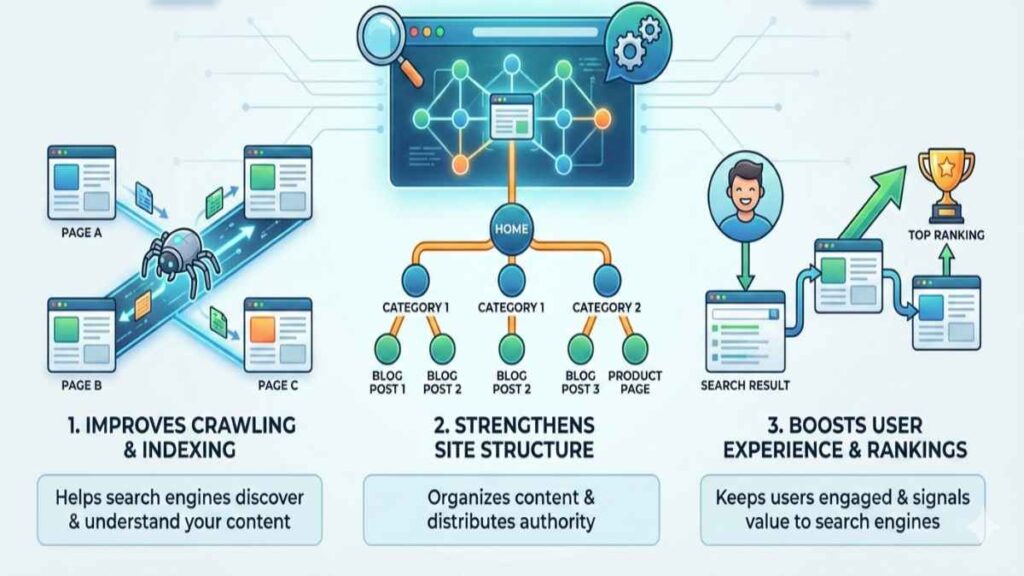
Search engines use internal links to discover new content and determine how pages are connected. When a page is linked internally, it signals to search engines that the page is important and relevant.
Internal links also help search engine bots crawl your site more efficiently. Pages that receive more internal links are crawled more often, which can lead to faster indexing and better visibility in search results. Internal links help bots crawl pages more efficiently, which is a core part of how search engines work.
7 Key Benefits of Internal Linking for SEO
Internal linking is a fundamental SEO practice that helps both search engines and users navigate your website more effectively. When done correctly, it strengthens your site’s structure, improves rankings, and enhances user experience. Below are the seven key benefits of internal linking for SEO.
1. Improves Website Crawlability and Indexing
Internal linking makes it easier for search engine bots to navigate your website. Well-structured internal links ensure that all important pages are reachable, reducing the risk of orphan pages that are not indexed properly.
By linking strategically, you help search engines find and understand your content faster, especially new or updated pages.
2. Strengthens Website Structure and Hierarchy
Internal links create a clear hierarchy within your website. They show search engines which pages are the most important and how content is organized.
Using internal linking effectively supports pillar and cluster content models, where a main topic page links to related subtopics. This structure improves topical authority and helps your site rank for competitive keywords.
3. Distributes Link Equity Across Pages
One of the biggest SEO benefits of internal linking is link equity distribution. Pages with strong authority can pass value to other pages through internal links, helping those pages rank better.
This is especially helpful for boosting newer or underperforming pages by linking them from high-traffic or high-authority content.
4. Enhances User Experience
Internal links guide users to relevant content, keeping them engaged longer on your website. When visitors can easily find helpful information, they are more likely to stay, explore, and convert.
Improved navigation reduces bounce rates and increases time on site both of which are positive signals for SEO performance. When internal links are placed naturally within engaging content, such as storytelling in content marketing, users stay longer and explore more pages.
5. Increases Keyword and Topical Relevance
Using descriptive and relevant anchor text helps search engines understand what a linked page is about. Internal links provide context, reinforcing keyword relevance and supporting semantic SEO.
This helps your pages rank for related search queries and improves overall topical coverage.
6. Helps Pages Rank Faster
New pages linked from established, high-authority content are discovered and indexed more quickly. Internal linking signals importance, helping pages gain visibility and rank faster in search results.
7. Supports Topical Authority
Internal linking connects related content, strengthening your site’s topical relevance. This helps position your website as an authority in your niche and improves long-term organic visibility.
Best Practices for Internal Linking
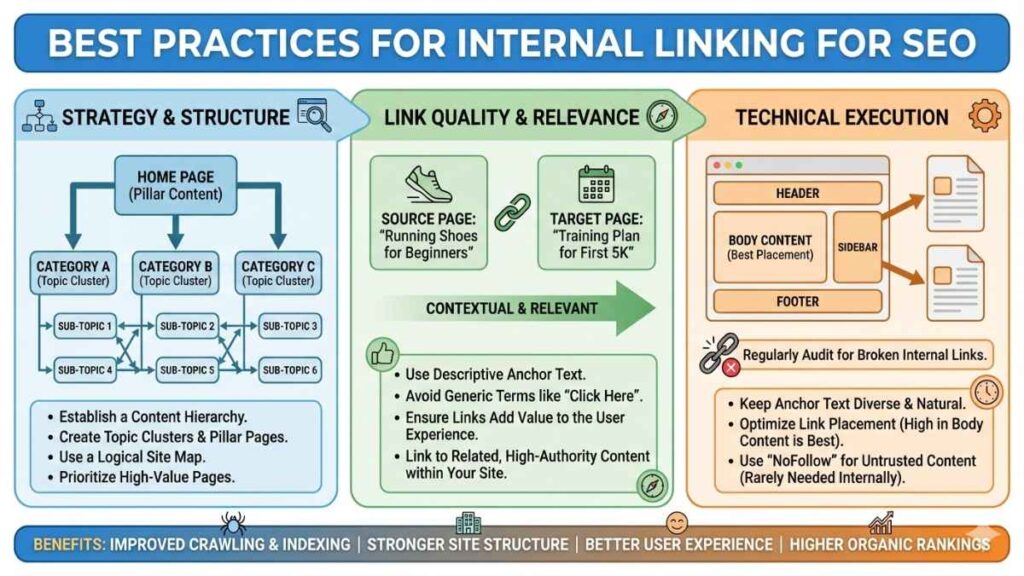
Internal linking is most effective when it’s done strategically and with users in mind. Following best practices ensures your internal links support SEO performance while improving navigation and content discovery. Fixing broken internal links is a key part of technical SEO and improves crawl efficiency.
Use Descriptive and Relevant Anchor Text
Always use clear, keyword-relevant anchor text that accurately describes the linked page. Avoid generic phrases like “click here” or “read more,” as they provide little context to search engines and users.
Link to Relevant and Related Content
Internal links should connect pages that are contextually related. Linking relevant content helps search engines understand topic relationships and provides users with meaningful next steps.
Prioritize Important Pages
Link more frequently to high-value pages such as cornerstone content, service pages, or key product categories. This signals importance to search engines and helps distribute link equity effectively.
Avoid Over-Linking
Adding too many internal links can overwhelm users and dilute SEO value. Keep links natural and purposeful, focusing on quality over quantity.
Use a Logical Site Structure
Organize your internal links to reflect a clear hierarchy. Use categories, subcategories, and pillar pages to guide both users and search engines through your site logically.
Fix Broken Internal Links
Broken links harm user experience and waste crawl budgets. Regularly audit your site to identify and fix broken or outdated internal links.
Link Deep, Not Just to the Homepage
Avoid linking only to top-level pages. Deep linking to blog posts, product pages, or guides helps distribute authority across your site and improves the visibility of less prominent pages.
Add Internal Links Naturally Within Content
Place internal links where they make sense within the content, rather than forcing them into footers or sidebars. Contextual links within body text carry more SEO value.
Update Internal Links Regularly
As you publish new content, update older posts with links to newer, relevant pages. This keeps your internal linking structure fresh and effective.
Common Internal Linking Mistakes to Avoid
Internal linking can significantly improve your SEO performance, but only when done correctly. Poor internal linking practices can confuse search engines, weaken site structure, and hurt user experience. Below are the most common internal linking mistakes you should avoid.
Using generic anchor text like “click here”
Over-optimizing anchor text with exact keywords
Linking to irrelevant or unrelated pages
Ignoring orphan pages with no internal links
Adding too many internal links on a single page
Leaving broken or outdated internal links
Only linking to homepage or top-level pages
Not linking to deep or important content
Hiding internal links in footers or sidebars
Avoid keyword stuffing in anchor text and focus on creating meaningful connections between related content.
Internal Linking for Different Types of Websites
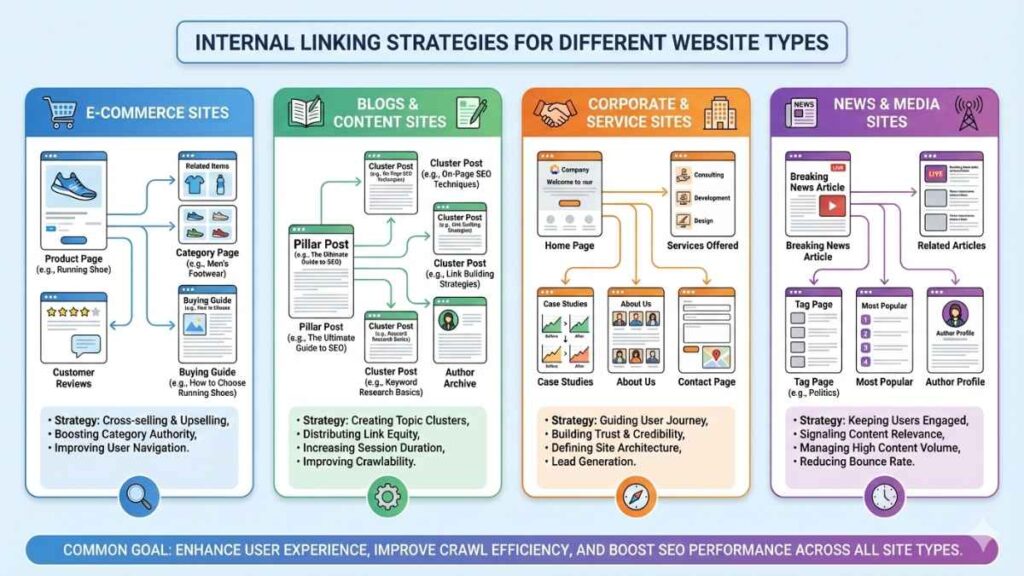
Internal linking strategies should be tailored to the type of website you run. Each website structure has unique goals, content types, and user journeys, which means internal links must be used differently to maximize SEO benefits.
Blogs and Content-Based Websites
For blogs, internal linking helps connect related articles and build topical authority. Linking older posts to newer content improves crawlability and keeps readers engaged longer. Blog sites benefit from using pillar pages that link to multiple related posts, creating a strong content cluster structure.
E-Commerce Websites
E-commerce sites rely on internal linking to guide users from category pages to product pages and related items. Internal links improve product discoverability, help search engines understand category relationships, and increase conversions by suggesting related or complementary products.
Service-Based Websites
Service websites use internal linking to connect blog content with service pages. This helps drive qualified traffic from informational content to conversion-focused pages while strengthening keyword relevance for service-related searches.
Corporate and Business Websites
Corporate websites benefit from clear internal links between pages, services, case studies, and resources. This structure improves navigation, enhances user experience, and helps search engines understand the company’s expertise and offerings.
News and Media Websites
News websites use internal links to connect trending stories, archives, and related articles. This improves page views, keeps users engaged, and helps search engines discover fresh and evergreen content quickly.
Local Business Websites
Local businesses should internally link location pages, service pages, and blog posts. This supports local SEO by strengthening geographic relevance and helping search engines associate services with specific locations.
Tools to Audit and Improve Internal Links
Auditing and improving internal links is essential for maintaining a healthy website structure and strong SEO performance. The right tools can help you identify broken links, orphan pages, and missed internal linking opportunities. Below are some of the most effective tools for auditing and improving internal links.
Google Search Console – identifies internal links, crawl errors, and indexing issues
Screaming Frog SEO Spider – finds broken links, orphan pages, and link depth problems
Ahrefs – analyzes internal link distribution and orphan pages
SEMrush – audits internal links and highlights structural issues
Sitebulb – provides visual internal linking and crawl path reports
Yoast SEO (WordPress) – suggests internal linking opportunities and flags orphan content
Regular audits ensure your internal links remain effective and up to date. Internal linking is a foundational element of SEO in digital marketing that helps improve visibility and rankings.
Conclusion
Internal linking is essential for SEO because it improves crawlability, strengthens site structure, distributes link equity, and enhances user experience. A well-planned internal linking strategy helps search engines understand your content and makes it easier for users to navigate your site.
By implementing smart internal linking practices, you can significantly improve your website’s rankings, visibility, and long-term SEO success.
FAQs
What are internal links in SEO?
Internal links connect pages within the same website and help search engines understand site structure.
Do internal links help rankings?
Yes, they distribute link equity and improve page relevance, which can boost rankings.
How many internal links should a page have?
There is no fixed number; links should be natural, relevant, and user-focused.
What anchor text is best for internal links?
Descriptive and keyword-relevant anchor text works best.
How often should internal links be updated?
Internal links should be reviewed regularly, especially when adding or updating content.