
Internal linking is one of the most underrated yet powerful strategies in SEO. Done right, it can help search engines crawl your site more efficiently, improve user experience, and boost your rankings. In this guide, we’ll walk through everything you need to know about internal linking and how to use it to maximize your SEO performance.
What Are Internal Links?
Internal links are hyperlinks that connect one page of your website to another page on the same domain. Unlike external links, which point to other websites, internal links help organize your site and spread authority across pages.
Types of Internal Links:
Navigational links: Found in menus and footers, helping users move around your site
Contextual links: Placed naturally within content to link related articles
Sidebar links: Common on blogs to highlight related content or categories
Footer links: Often used for legal pages, sitemap, or main categories
Example: Linking your blog post about “SEO Tips” to another post about “Keyword Research Strategies” within the content is a contextual internal link.
Why Internal Linking Matters for SEO
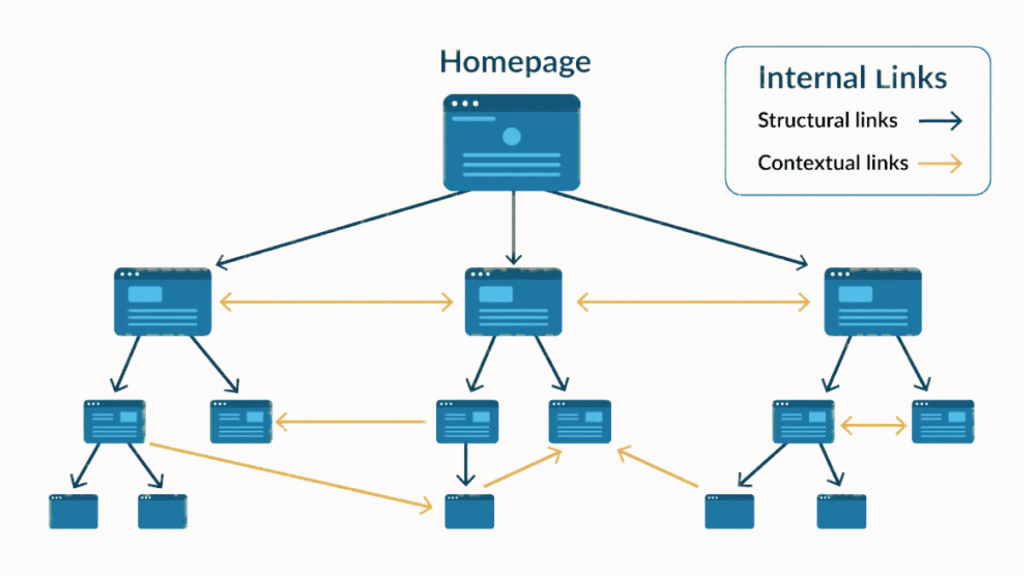
Internal linking does more than connect pages it strengthens your website’s SEO in multiple ways:
Improves Crawlability: Search engines use links to discover and index pages. A solid internal linking structure ensures every important page is accessible.
Distributes Page Authority (Link Juice): Linking high-authority pages to new or underperforming pages boosts their ranking potential.
Enhances User Experience: Internal links guide users to related content, reducing bounce rates and increasing time on site.
Boosts Keyword Rankings: Well-placed anchor text signals the topic of the linked page to search engines, helping it rank for specific keywords.
Supports Content Strategy: Linking related content creates topic clusters, which Google loves for understanding site relevance.
How to Structure Internal Links for Maximum SEO Impact
1. Design a Clear Site Structure
A strong website structure is the backbone of any effective internal linking plan. The best approach is a hierarchical layout, starting with your homepage, followed by primary categories, subcategories, and then individual blog posts or pages. This format helps Google crawl your site efficiently and makes it easier for users to navigate.
2. Use Keyword-Rich Anchor Text
Your anchor text (the clickable text in a link) should be clear, relevant, and rich in target keywords. Instead of vague phrases like “click here” or “learn more,” use descriptive terms that signal what the linked content is about.
3. Highlight High-Authority Pages
Identify your cornerstone content the pages that deliver the most value and link to them from other relevant posts. This tells search engines that these are your most important pages and helps funnel link juice (link authority) to them.
4. Maintain Contextual Relevance
Only create internal links where they make sense. Linking should feel natural within the flow of your content and should lead to pages that expand on or support the topic at hand. Google values contextual relevance, and so do your readers.
5. Build a Silo Structure
A silo structure involves grouping related content and linking them together to reinforce a central theme. This method strengthens topical authority and improves how your content ranks for keyword clusters related to that topic.
6. Balance Internal Link Distribution
Avoid linking excessively to just a few pages. Instead, aim for a balanced internal link profile by spreading links across your site. Every valuable page should receive some attention to share and receive link equity effectively.
7. Refresh Older Content with New Links
Don’t let older posts become dead ends. Regularly update them with internal links to newer pages or blog entries. This not only improves content discoverability but also signals to Google that your site is actively maintained.
8. Create Topic-Focused Content Hubs
A content hub is a central page (like a pillar post) that links to multiple related articles, forming a tightly connected cluster. This boosts navigation, encourages deeper site exploration, and tells search engines that your site is a trusted resource on the topic.
9. Prioritize User Experience
Above all, your internal links should make your site easier to use. Ensure links are visible, logically placed, and lead to valuable content. A seamless user journey reduces bounce rates, increases time on site, and improves overall SEO performance.
Common Internal Linking Mistakes to Avoid
Even small errors can reduce the effectiveness of internal linking:
Over-Optimizing Anchor Text: Using the same keyword repeatedly can trigger Google penalties.
Too Many or Too Few Links: Over-linking looks spammy; under-linking reduces SEO benefits.
Broken Links or Orphan Pages: Pages without internal links rarely rank. Regularly audit your site to fix broken links.
Ignoring Site Hierarchy: Failing to create a logical structure reduces link equity flow.
Linking Irrelevant Content: Links should always provide value to the reader.
Tools to Improve Internal Linking
Several tools make internal linking easier to manage:
Ahrefs: Analyze internal links, check orphan pages, and track link equity.
SEMrush: Audit internal links and see which pages need attention.
Screaming Frog: Identify broken links and optimize structure efficiently.
WordPress Plugins: Yoast SEO and Rank Math suggest internal links as you create content.
Tip: Regularly audit your site to ensure no broken or outdated links exist.
Best Practices for Internal Linking in 2026
Keep links natural and user-focused: Avoid forcing keywords into every link.
Update links regularly: Add new internal links when creating new content.
Prioritize cornerstone content: Link high-authority pages to new or underperforming pages.
Use descriptive anchor text: Help readers and search engines understand the link context.
Ensure mobile-friendly linking: Make links clickable and easy to use on small screens.
Advanced Internal Linking Techniques
Topic Clusters & Pillar Pages: Group related content under a main pillar page. This signals topical authority to Google.
Dynamic Linking: Automatically suggest related posts within long-form content.
Combine Internal & External Links: Linking to high-authority external sites improves credibility and context.
Use “Next” and “Previous” Links: On blog series or product guides, these help users navigate sequentially.
Measuring the Success of Your Internal Linking Strategy
Track performance with:
Page Authority & Link Equity: Tools like Ahrefs or SEMrush show which pages benefit most.
User Engagement Metrics: Monitor bounce rate, session duration, and pages per session in Google Analytics.
Ranking Changes: Observe how internal linking affects keyword rankings over time.
Crawl Reports: Ensure all pages are being indexed properly.
Pro Tip: Focus on improving pages that are important for conversions or organic traffic.
Conclusion
Internal linking is more than just a technical SEO tactic; it’s a strategy that boosts crawlability, authority, user experience, and rankings. Start by analyzing your current site structure, linking cornerstone pages to related content, and building topic clusters. Over time, consistent internal linking will improve SEO performance, increase organic traffic, and enhance your site’s overall usability.
FAQs
Internal links connect pages within your website, while external links point to other websites. Both affect SEO differently.
Generally, 3–10 relevant internal links per page is optimal. Quality and relevance matter more than quantity.
Yes, particularly for underperforming pages, but results may take a few weeks to show.
No. Use a mix of exact match, partial match, and natural phrases to avoid over-optimization.
Ahrefs, SEMrush, Screaming Frog, and WordPress plugins like Yoast SEO or Rank Math.